
182 lines
5.8 KiB
Markdown
182 lines
5.8 KiB
Markdown
# How to set up high availability storage with GlusterFS on Ubuntu 18.04
|
||
|
||
- **期号**: SRE Weekly Issue #135(2018-08-19)
|
||
- **作者**: Jack Wallen — TechRepublic
|
||
- **链接**: https://www.techrepublic.com/article/how-to-set-up-high-availability-storage-with-glusterfs-on-ubuntu-18-04/
|
||
|
||
## 简介
|
||
|
||
This article goes step-by-step through setting up a 3-server GlusterFS cluster.
|
||
|
||
## 正文
|
||
|
||

|
||
|
||
Image: Jack Wallen
|
||
|
||
GlusterFS is a network file system capable of handling petabytes of data and thousands of users. For your data center Linux servers, GlusterFS might well be the file system you need for on-premises storage.
|
||
|
||
### More about data centers
|
||
|
||
-
|
||
|
||
[Stargate Norway: OpenAI’s First AI Data Center in Europe](https://www.techrepublic.com/article/news-openai-stargate-norway-ai-data-center/)
|
||
-
|
||
|
||
[AI Data Centers’ Soaring Energy Use: Who Pays for Higher Utilities Costs?](https://www.techrepublic.com/article/news-ai-data-center-energy-utilities/)
|
||
-
|
||
|
||
[China’s Submerged AI Data Center Could ‘Influence Global Sustainable Computing’](https://www.techrepublic.com/article/news-china-underwater-ai-data-center-shanghai/)
|
||
-
|
||
|
||
[Google to Power Data Centers With Nuclear Energy by 2030 in First-Of-A-Kind’ Agreement](https://www.techrepublic.com/article/news-google-data-centers-nuclear-energy-2030/)
|
||
|
||
I’m going to show you how to set up three Ubuntu servers that will represent a single namespace, using GlusterFS. I’ll be demonstrate on Ubuntu 18.04 and will assume you already have three Ubuntu Servers ready to go.
|
||
|
||
And with that said, let’s get GlusterFS up and running.
|
||
|
||
**SEE: [Quick glossary: Storage](http://b2b.cbsimg.net/downloads/TRPro/QG_storage.pdf) (Tech Pro Research)**
|
||
|
||
## The layout
|
||
|
||
I have three Ubuntu 18.04 servers at the following addresses:
|
||
|
||
- 192.168.1.206
|
||
- 192.168.1.207
|
||
- 192.168.1.208
|
||
|
||
## Mapping addresses
|
||
|
||
Open up the hosts file on each server with the command *sudo nano /etc/hosts* and then add the following (modifying to fit your IP address scheme):
|
||
|
||
`192.168.1.206 gfs01`
|
||
|
||
192.168.1.207 gfs02
|
||
|
||
192.168.1.208 gfs03
|
||
|
||
Save and close those files.
|
||
|
||
To make matters clearer, change the hostnames for each server to represent that which is mapped in the hosts file.
|
||
|
||
## Add the necessary repository
|
||
|
||
On each server, issue the following commands to add the necessary dependency, repository, and key:
|
||
|
||
`sudo apt install software-properties-common -y`
|
||
|
||
wget -O- https://download.gluster.org/pub/gluster/glusterfs/3.12/rsa.pub | apt-key add -
|
||
|
||
sudo add-apt-repository ppa:gluster/glusterfs-3.12
|
||
|
||
|
||
## Installing, starting, and enabling GlusterFS
|
||
|
||
From the terminal on gfs01 and gfs02, issue the following command to install GlusterFS:
|
||
|
||
`sudo apt install glusterfs-server -y`
|
||
|
||
Now we can start and enable GlusterFS with the commands:
|
||
|
||
`sudo systemctl start glusterd`
|
||
|
||
sudo systemctl enable glusterd
|
||
|
||
## Configure GlusterFS
|
||
|
||
The first thing to do is to create a trusted pool. This is done on gfs01 with the command:
|
||
|
||
`sudo gluster peer probe gfs02`
|
||
|
||
You should immediately see *peer probe: success.*
|
||
|
||
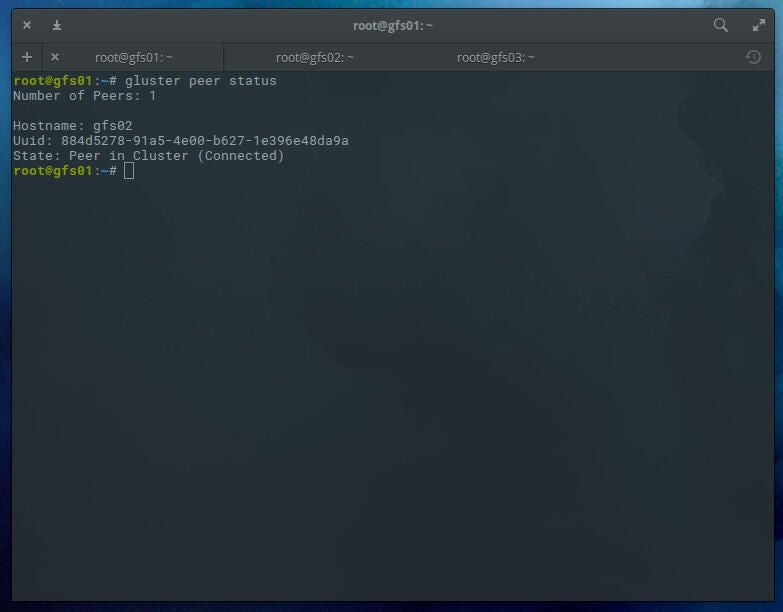
You can check the status of peers with the command:
|
||
|
||
`sudo gluster peer status`
|
||
|
||
You should see that 1 peer has been added (**Figure A**).
|
||
|
||
**Figure A**
|
||
|
||
|
||
|
||
|
||
## Create a distributed GlusterFS volume
|
||
|
||
With our pool created, we must create a distributed GlusterFS volume. I would recommend creating this volume on a partition that isn’t within the system directory, otherwise sync errors may occur. Create a new directory on both gfs01 and gfs02 with the command:
|
||
|
||
`sudo mkdir -p /glusterfs/distributed`
|
||
|
||
Next we can create the volume. We’ll create a volume named v01 with replicas gfs01 and gfs02 with the command (issued on gfs01):
|
||
|
||
`sudo gluster volume create v01 replica 2 transport tcp gfs01:/glusterfs/distributed gfs02:/glusterfs/distributed`
|
||
|
||
After the distributed filesystem has been created, you need to start the volume with the command:
|
||
|
||
`sudo gluster volume start v01`
|
||
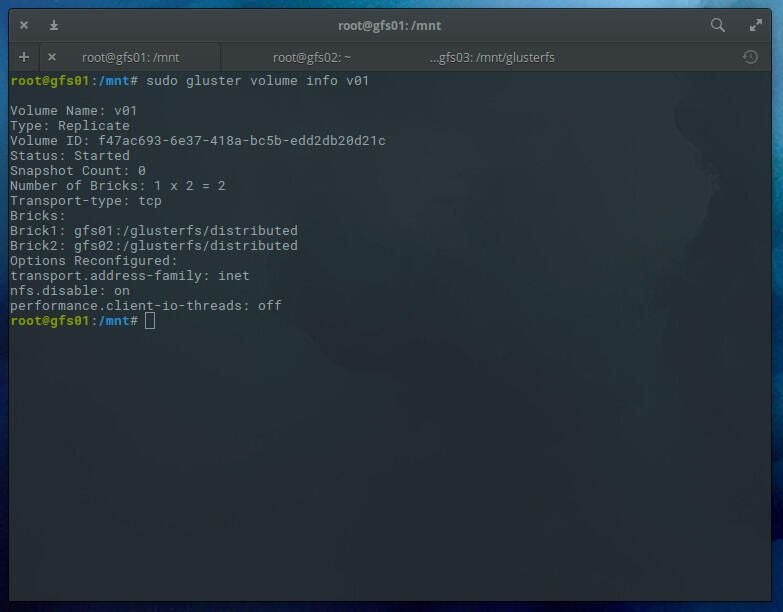
You can check the status of the volume with the command:
|
||
|
||
`sudo gluster volume info v01`
|
||
|
||
You should see the volume has been started (**Figure B**).
|
||
|
||
**Figure B**
|
||
|
||
|
||
|
||
|
||
## The GlusterFS client
|
||
|
||
We’re going to use gfs03 as our client. To install the necessary package, issue the command:
|
||
|
||
`sudo apt install glusterfs-client -y`
|
||
|
||
After the installation completes, create a mount point with the command:
|
||
|
||
`sudo mkdir -p /mnt/glusterfs`
|
||
|
||
Mount the distributed glusterfs volume with the command:
|
||
|
||
`sudo mount -t glusterfs gfs01:/v01 /mnt/glusterfs/`
|
||
|
||
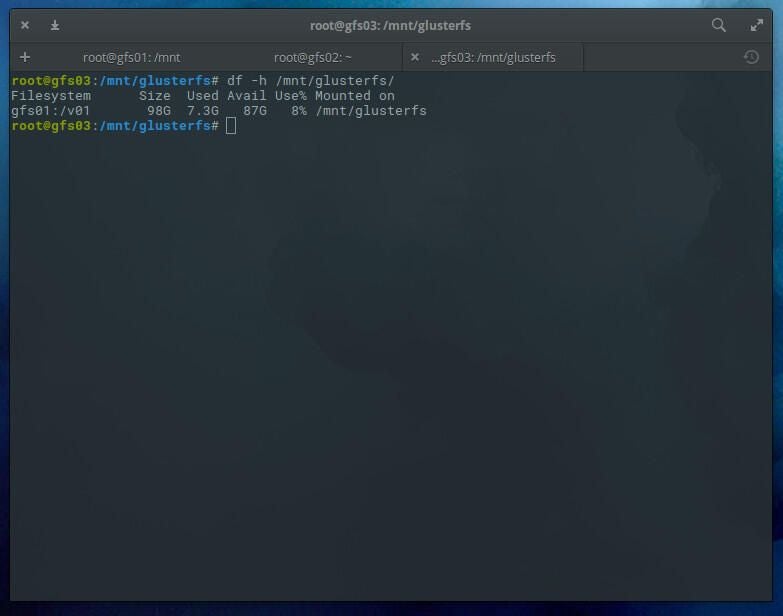
Check the volume with the command:
|
||
|
||
`df -h /mnt/glusterfs`
|
||
|
||
You should see the volume has been successfully mounted (**Figure C**).
|
||
|
||
**Figure C**
|
||
|
||
|
||
|
||
|
||
To make this mount happen upon reboot, and add the following line to the gfs03 */etc/fstab* file:
|
||
|
||
`gfs01:/v01 /mnt/glusterfs glusterfs defaults,_netdev 0 0`
|
||
|
||
Now, should you have to reboot your server, the GlusterFS volume will automatically mount.
|
||
|
||
## Testing
|
||
|
||
On gsf01, issue the command:
|
||
|
||
`sudo mount -t glusterfs gfs01:/v01 /mnt`
|
||
|
||
On gsf02, issue the command:
|
||
|
||
`sudo mount -t glusterfs gfs02:/v01 /mnt`
|
||
|
||
Now go back to gfs03 and create a test file with the command:
|
||
|
||
`sudo touch /mnt/glusterfs/testing`
|
||
|
||
Go back to both gfs01 and gfs02 and issue the command:
|
||
|
||
`ls /mnt`
|
||
|
||
You should see the empty testing file created on gfs03.
|
||
|
||
At this point, any file created within the mounted volume will be automatically distributed to the nodes. You can create files on gfs01 or gfs02 at */mnt* or gfs03 at */mnt/glusterfs,* and they will automatically sync.
|
||
|
||
And that is a GlusterFS distributed file system that offers significant scaling and reliability.
|