
263 lines
13 KiB
Markdown
263 lines
13 KiB
Markdown
# What Tracking Down Missing TCP Keepalives Taught Me About Docker, Golang, and GitLab
|
||
|
||
- **期号**: SRE Weekly Issue #194(2019-11-17)
|
||
- **作者**: Stan Hu — GitHub
|
||
- **链接**: https://about.gitlab.com/blog/2019/11/15/tracking-down-missing-tcp-keepalives/
|
||
|
||
## 简介
|
||
|
||
<3 detailed debugging stories. TIL: Google Compute Engine’s network drops connections from its state table after 10 minutes with no packets.
|
||
|
||
## 正文
|
||
|
||
To search repositories and projects, login to [gitlab.com](https://gitlab.com/users/sign_in/).
|
||
|
||
Ship at agent speed. Prove every step. Transcend returns on October 6.Register now
|
||
|
||
Published on: November 15, 2019
|
||
|
||
9 min read
|
||
|
||
An in-depth recap of debugging a bug in the Docker client library.
|
||
|
||
This blog post was originally published on the GitLab Unfiltered blog. It was reviewed and republished on 2019-12-03.
|
||
|
||
What began as failure in a GitLab static analysis check led to a
|
||
dizzying investigation that uncovered a subtle [bug in the Docker client
|
||
library code](https://github.com/docker/for-linux/issues/853) used by
|
||
the GitLab Runner. We ultimately worked around the problem by upgrading
|
||
the Go compiler, but in the process we uncovered an unexpected change in
|
||
the Go TCP keepalive defaults that fixed an issue with Docker and GitLab
|
||
CI.
|
||
|
||
This investigation started on October 23, when backend engineer Luke
|
||
Duncalfe mentioned, "I'm seeing
|
||
[`static-analysis` failures with no output](https://gitlab.com/gitlab-org/gitlab/-/jobs/331174397).
|
||
Is there something wrong with this job?" He opened [a GitLab
|
||
issue](https://gitlab.com/gitlab-org/gitlab/issues/34951) to discuss.
|
||
|
||
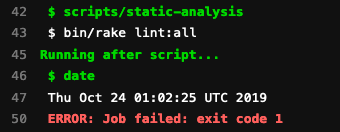
When Luke ran the static analysis check locally on his laptop, he saw useful debugging output when the test failed. For example, an extraneous newline would accurately be reported by Rubocop. However, when the same test ran in GitLab's automated test infrastructure, the test failed quietly:
|
||
|
||
|
||
|
||
|
||
Notice how the job log did not include any clues after the `bin/rake lint:all` step. This made it difficult to determine whether a real
|
||
problem existed, or whether this was just a flaky test.
|
||
|
||
In the ensuing days, numerous team members reported the same problem. Nothing kills productivity like silent test failures.
|
||
|
||
In the past, we had seen that if that specific test generated enough
|
||
errors, [the output buffer would fill up, and the continuous integration
|
||
(CI) job would lock
|
||
indefinitely](https://gitlab.com/gitlab-org/gitlab-foss/issues/61432). We
|
||
thought we had [fixed that issue months
|
||
ago](https://gitlab.com/gitlab-org/gitlab-foss/merge_requests/28402). Upon
|
||
further review, that fix seemed to eliminate any chance of a thread
|
||
deadlock.
|
||
|
||
Did we have to flush the buffer? No, because the Linux kernel will do that for an exiting process already.
|
||
|
||
When a test runs in GitLab CI, the [GitLab
|
||
Runner](https://gitlab.com/gitlab-org/gitlab-runner/) launches a Docker
|
||
container that runs commands specified by a `.gitlab-ci.yml` inside the
|
||
project repository. As the job runs, the runner streams the output to
|
||
the GitLab API via PATCH requests. The GitLab backend saves this data
|
||
into a file. The following sequence diagram shows how this works:
|
||
|
||
```
|
||
== Get a job! ==
|
||
Runner -> GitLab: POST /api/v4/jobs/request
|
||
GitLab -> Runner: 201 Job was scheduled
|
||
== Job sends logs (1 of 2) ==
|
||
Runner -> GitLab: PATCH /api/v4/job/:id/trace
|
||
GitLab -> File: Save to disk
|
||
GitLab -> Runner: 202 Accepted
|
||
== Job sends logs (2 of 2) ==
|
||
Runner -> GitLab: PATCH /api/v4/job/:id/trace
|
||
GitLab -> File: Save to disk
|
||
GitLab -> Runner: 202 Accepted
|
||
```
|
||
Henrich Lee Yu mentioned
|
||
that we had recently disabled a feature flag that changed how GitLab
|
||
handled CI job
|
||
logs. [The
|
||
timing seemed to line
|
||
up](https://gitlab.com/gitlab-org/gitlab/issues/34951#note_236723888).
|
||
|
||
This feature, called live CI traces, eliminates the need for a shared POSIX filesystem (e.g., NFS) when saving job logs to disk by:
|
||
|
||
1. Streaming data into memory via Redis
|
||
2. Persisting the data in the database (PostgreSQL)
|
||
3. Archiving the final data into object storage
|
||
|
||
When this flag is enabled, the flow of CI job logs looks something like the following:
|
||
|
||
```
|
||
== Get a job! ==
|
||
Runner -> GitLab: POST /api/v4/jobs/request
|
||
GitLab -> Runner: 201 Job was scheduled
|
||
== Job sends logs ==
|
||
Runner -> GitLab: PATCH /api/v4/job/:id/trace
|
||
GitLab -> Redis: Save chunk
|
||
GitLab -> Runner: 202 Accepted
|
||
...
|
||
== Copy 128 KB chunks from Redis to database ==
|
||
GitLab -> Redis: GET gitlab:ci:trace:id:chunks:0
|
||
GitLab -> PostgreSQL: INSERT INTO ci_build_trace_chunks
|
||
...
|
||
== Job finishes ==
|
||
Runner -> GitLab: PUT /api/v4/job/:id
|
||
GitLab -> Runner: 200 Job was updated
|
||
== Archive trace to object storage ==
|
||
```
|
||
Looking at the flow diagram above, we see that this approach has more steps. After receiving data from the runner, something could have gone wrong with handling a chunk of data. However, we still had many questions:
|
||
|
||
1. Did the runners send the right data in the first place?
|
||
2. Did GitLab drop a chunk of data somewhere?
|
||
3. Did this new feature actually have anything to do with the problem?
|
||
4. Are they really making another Gremlins movie?
|
||
|
||
`.gitlab-ci.yml`
|
||
To help answer those questions, we simplified the `.gitlab-ci.yml` to
|
||
run only the `static-analysis` step. We inserted a known Rubocop error,
|
||
replacing a `eq` with `eql`. We first ran this test on a separate GitLab
|
||
instance with a private runner. No luck there – the job showed the right
|
||
output:
|
||
|
||
```
|
||
Offenses:
|
||
ee/spec/models/project_spec.rb:55:42: C: RSpec/BeEql: Prefer be over eql.
|
||
expect(described_class.count).to eql(2)
|
||
^^^
|
||
12669 files inspected, 1 offense detected
|
||
```
|
||
However, we repeated the test on our staging server and found that we reproduced the original problem. In addition, the live CI trace feature flag had been activated on staging. Since the problem occurred with and without the feature, we could eliminate that feature as a possible cause.
|
||
|
||
Perhaps something with the GitLab server environment caused a problem. For example, could the load balancers be rate-limiting the runners? As an experiment, we pointed a private runner at the staging server and re-ran the test. This time, it succeeded: the output was shown. That seemed to suggest that the problem had more to do with the runner than with the server.
|
||
|
||
One key difference between the two tests: One runner used a shared,
|
||
autoscaled runner using a [Docker
|
||
Machine](https://docs.docker.com/machine/overview/) executor, and the
|
||
private runner used a [Docker
|
||
executor](https://docs.gitlab.com/runner/executors/docker/).
|
||
|
||
What does Docker Machine do exactly? The following diagram may help illustrate:
|
||
|
||

|
||
|
||
|
||
The top-left shows a local Docker instance. When you run Docker from the
|
||
command-line interface (e.g., `docker attach my-container`), the program
|
||
just makes [REST calls to the Docker Engine
|
||
API](https://docs.docker.com/engine/api/v1.40/).
|
||
|
||
The rest of the diagram shows how Docker Machine fits into the
|
||
picture. Docker Machine is an entirely separate program. The GitLab
|
||
Runner shells out to `docker-machine` to create and destroy virtual
|
||
machines using cloud-specific (e.g. Amazon, Google, etc.) drivers. Once
|
||
a machine is running, the runner then uses the Docker Engine API to run,
|
||
watch, and stop containers.
|
||
|
||
Note that this API is used securely over an HTTPS connection. This is an important difference between the Docker Machine executor and Docker executor: The former needs to communicate across the network, while the latter can either use a local TCP socket or UNIX domain socket.
|
||
|
||
We've known for a while that Google Cloud [has a 10-minute idle
|
||
timeout](https://cloud.google.com/compute/docs/troubleshooting/general-tips),
|
||
which has caused issues in the past:
|
||
|
||
Note that idle connections are tracked for a maximum of 10 minutes, after which their traffic is subject to firewall rules, including the implied deny ingress rule. If your instance initiates or accepts long-lived connections with an external host, you should adjust TCP keep-alive settings on your Compute Engine instances to less than 600 seconds to ensure that connections are refreshed before the timeout occurs.
|
||
|
||
|
||
Was the problem caused by this timeout? With the Docker Machine
|
||
executor, we found that we could reproduce the problem with a simple
|
||
`.gitlab-ci.yml`:
|
||
|
||
```
|
||
image: "busybox:latest"
|
||
test:
|
||
script:
|
||
- date
|
||
- sleep 601
|
||
- echo "Hello world!"
|
||
- date
|
||
- exit 1
|
||
```
|
||
This would reproduce the failure, where we would never see the `Hello world!` output. Changing the `sleep 601` to `sleep 599` would make the
|
||
problem go away. Hurrah! All we have to do is tweak the system TCP
|
||
keepalives, right? Google provided these sensible settings:
|
||
|
||
```
|
||
sudo /sbin/sysctl -w net.ipv4.tcp_keepalive_time=60 net.ipv4.tcp_keepalive_intvl=60 net.ipv4.tcp_keepalive_probes=5
|
||
```
|
||
However, enabling these kernel-level settings didn't solve the problem. Were keepalives even being sent? Or was there some other issue? We turned our attention to network traces.
|
||
|
||
In order to understand what was happening, we needed to be able to monitor the network communication between the runner and the Docker container. But how exactly does the GitLab Runner stream data from a Docker container to the GitLab server? The following diagram illustrates the flow:
|
||
|
||
```
|
||
Runner -> Docker: POST /containers/name/attach
|
||
Docker -> Runner: <container output>
|
||
Docker -> Runner: <container output>
|
||
Runner -> GitLab: PATCH /api/v4/job/:id/trace
|
||
GitLab -> File: Save to disk
|
||
GitLab -> Runner: 202 Accepted
|
||
```
|
||
First, the runner makes a [POST request to attach to the container
|
||
output](https://docs.docker.com/engine/api/v1.40/#operation/ContainerAttach).
|
||
As soon as a process running in the container outputs some data, Docker
|
||
will transmit the data over this HTTPS stream. The runner then copies
|
||
this data to GitLab via the PATCH request.
|
||
|
||
However, as mentioned earlier, traffic between a GitLab Runner and the remote Docker machine is encrypted over HTTPS on port 2376. Was there an easy way to disable HTTPS? Searching through the code of Docker Machine, we found that it did not appear to be supported out of the box.
|
||
|
||
Since we couldn't disable HTTPS, we had two ways to eavesdrop:
|
||
|
||
1. Use a man-in-the-middle proxy (e.g. [mitmproxy](https://mitmproxy.org/) )
|
||
2. Record the traffic and decrypt the traffic later using the private keys
|
||
|
||
The first seemed more straightforward, since [we already had experience
|
||
doing this with the Docker
|
||
client](https://docs.gitlab.com/administration/packages/container_registry/#running-the-docker-daemon-with-a-proxy).
|
||
|
||
However, after [defining the proxy variables for GitLab
|
||
Runner](https://docs.gitlab.com/runner/configuration/proxy/#adding-proxy-variables-to-the-runner-config),
|
||
we found we were only able to intercept the GitLab API calls with
|
||
`mitmproxy`. The Docker API calls still went directly to the remote
|
||
host. Something wasn't obeying the proxy configuration, but we didn't
|
||
investigate further. We tried the second approach.
|
||
|
||
To decrypt TLS data, we would need to obtain the encryption keys. Where
|
||
were these located for a newly-created system with `docker-machine`? It
|
||
turns out `docker-machine` worked in the following way:
|
||
|
||
1. Call the Google Cloud API to create a new machine
|
||
2. Create a `/root/.docker/machine/machines/:machine_name` directory
|
||
3. Generate a new SSH keypair
|
||
4. Install the SSH key on the server
|
||
5. Generate a new TLS certificate and key
|
||
6. Install and configure Docker on the newly-created machine with TLS certificates
|
||
|
||
As long as the machine runs, the directory will contain the information
|
||
needed to decode this traffic. We ran `tcpdump` and saved the private keys.
|
||
|
||
Our first attempt at decoding the traffic failed. Wireshark could not
|
||
decode the encrypted traffic, although general TCP traffic could still
|
||
be seen. Researching more, we found out why: If the encrypted traffic
|
||
used a [Diffie-Hellman key
|
||
exchange](https://en.wikipedia.org/wiki/Diffie%E2%80%93Hellman_key_exchange),
|
||
having the private keys would not suffice! This is by design, a property
|
||
called [perfect forward
|
||
secrecy](https://en.m.wikipedia.org/wiki/Forward_secrecy).
|
||
|
||
To get around that limitation, we modified the GitLab Runner to disable cipher suites that used the Diffie-Hellman key exchange:
|
||
|
||
```
|
||
diff --git a/vendor/github.com/docker/go-connections/tlsconfig/config_client_ciphers.go b/vendor/github.com/docker/go-connections/tlsconfig/config_client_ciphers.go
|
||
index 6b4c6a7c0..a3f86d756 100644
|
||
```
|
||
Engineering
|
||
|
||
Enjoyed reading this blog post or have questions or feedback? Share your thoughts by creating a new topic in the GitLab community forum.
|
||
|
||
Start building faster today
|
||
|
||
See what your team can do with the intelligent orchestration platform for DevSecOps.
|